
Vupress 自动部署的时间问题
Vupress 自动部署的时间问题
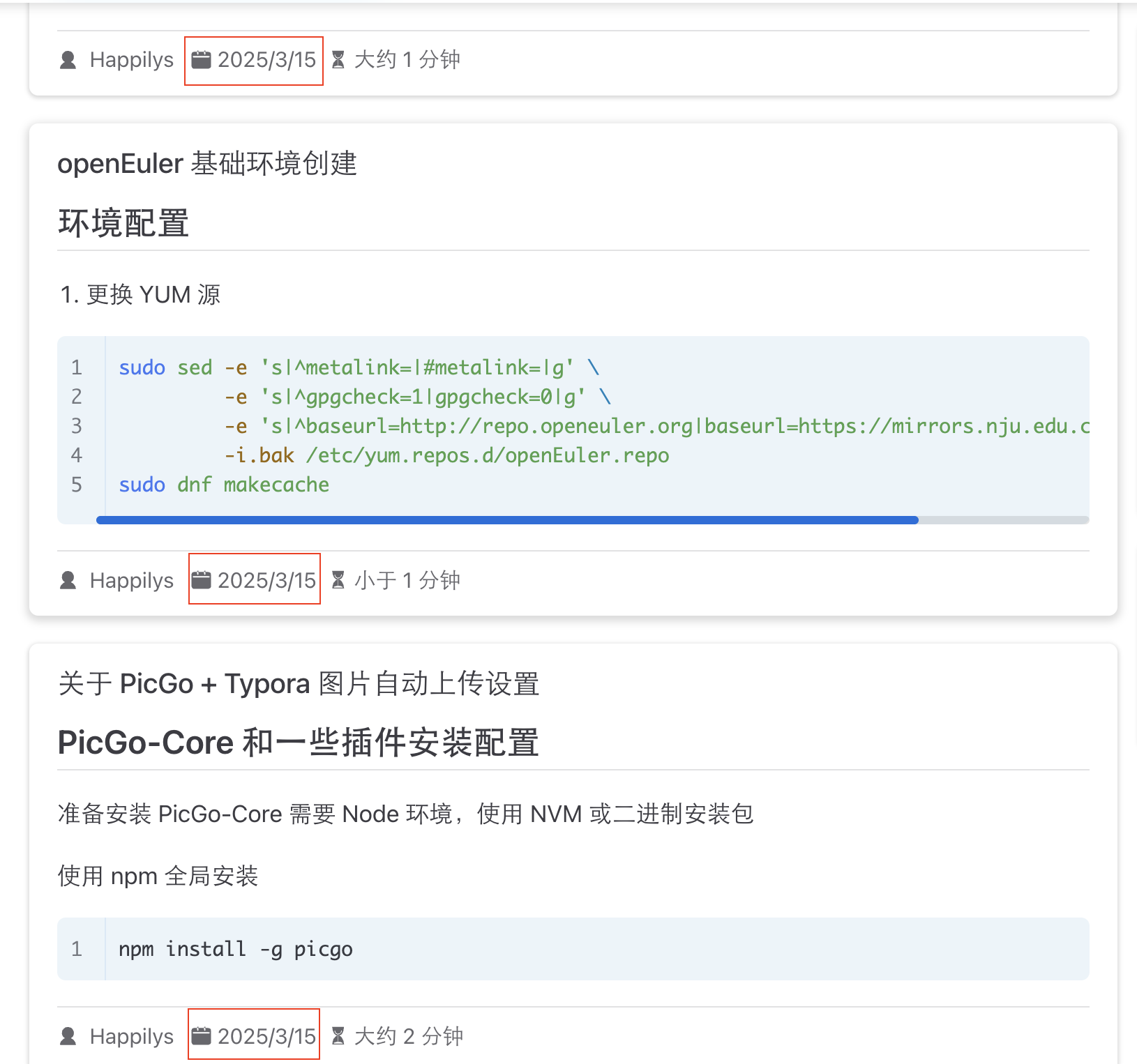
使用 Gitea Actions 来自动化部署 Vuepress 二月份已经整理出来,但部署的时候一直存在文章修改时间在同一天的问题。
另外 Vuepress 中的 plugin-git 插件是不能够获取 git 子模块中的文件修改时间,只能自己查看源码,打补丁。Vuepress 初始设计也许就没有计划给文档的内容独立出一个(私有)版本仓库,可是我希望将博客的主体框架和内容分开,于是只好自己实现了。第一版修改的内容如下
diff --git a/lib/node/utils/getCommits.js b/lib/node/utils/getCommits.js
index 18e0f5602df72dec54020f4847d34ace1c309e0d..1c19ce921ad2d127213c78a499a5e8d89728bcb3 100644
--- a/lib/node/utils/getCommits.js
+++ b/lib/node/utils/getCommits.js
@@ -1,4 +1,5 @@
 import { execa } from 'execa';
+import path from 'path';
 const SPLIT_CHAR = '[GIT_LOG_COMMIT_END]';
 const RE_SPLIT = /\[GIT_LOG_COMMIT_END\]$/;
 const RE_CO_AUTHOR = /^ *Co-authored-by: ?([^<]*)<([^>]*)> */gim;
@@ -32,7 +33,9 @@ const getFormat = ({ contributors, changelog }) => {
 export const getRawCommits = async (filepath, cwd, options) => {
     const format = getFormat(options);
     try {
+        filepath = path.basename(filepath);
         const { stdout } = await execa('git', [
+            `--git-dir=${cwd}/posts/.git`,
             'log',
             '--max-count=-1',
             `--format=${format}${SPLIT_CHAR}`,
plugin-git 获取时间补丁
仓库的目录结构如下,posts 目录是作为子模块被添加到当前的版本仓库的

查看 plugin-git 插件件中的 getCommits.js 文件,可以知道 Vuepress 是通过这条命令来获取文件的提交信息,工作目录则是 src 的绝对路径
git log --max-count=-1 --format='%H|%an|%ae|%ad|||%b[GIT_LOG_COMMIT_END]' --date=unix --follow -- post/Windows\ 远程桌面.md当它想要获取 posts 目录下的文件信息时,便不能获取相应的文件提交信息了。在 src 目录下,git 认为版本库信息指向的是 ./vuepress-starter/.git,而这个版本库里并没有 posts 仓库的提交信息。

经过调研,可以通过传递参数的办法显示指定 .git 目录,但是文件的相对路径需要相对于 .git 的父目录而言,也就是 ./vuepress-start/src/posts
git --git-dir=posts/.git log --max-count=-1 --format='%H|%an|%ae|%ad|||%b' --date=unix --follow -- Windows\ 远程桌面.md
第一版里将文章仓库地址写成了一个定值,文件路径也是手动取的一个相对值。这种方式,在 posts 下的文件能正常工作,再往下的子目录就不管用了;而且获取 src 下面的文件时间也失效了。
第二版改动后的内容用如下:
const getGitRepoRoot = (filePath, cwd) => {
    try {
        const repoRoot = execaSync('git', ['rev-parse', '--show-toplevel'],
            { cwd: path.dirname(path.join(cwd, filePath)) }).stdout;
        return path.normalize(repoRoot);
    } catch (error) {
        return null;
    }
};
/**
 * Get raw commits
 *
 * ${commit_hash} ${author_name} ${author_email} ${author_date} ${subject} ${ref} ${body}
 *
 * @see {@link https://git-scm.com/docs/pretty-formats | documentation} for details.
 */
export const getRawCommits = async (filepath, cwd, options) => {
    const format = getFormat(options);
    try {
        const gitRoot = getGitRepoRoot(filepath, cwd);
        const args = [
            'log',
            '--max-count=-1',
            `--format=${format}${SPLIT_CHAR}`,
            '--date=unix',
            '--follow',
            '--',
        ];
        if (gitRoot) {
            filepath = path.relative(gitRoot, path.join(cwd, filepath));
            const relativeRepoRoot = path.relative(cwd, gitRoot);
            args.unshift(`--git-dir=${relativeRepoRoot}/.git`);

            console.log(`\n${cwd} - ${gitRoot} - ${relativeRepoRoot}`);
        } else {
            console.log("Get git repo root error!");
        }

        args.push(filepath);
        const { stdout, command, stderr } = await execa('git', args, { cwd });
        console.log(`\n${stdout}\n${filepath}`);

      // 省略掉没改修改的代码
    catch {
        return [];
    }
}
大致思路就是获取正确的 .git 目录,重新计算文件的相对路径。因为不会去包装一个异步方法,所以用同步方式获取 .git 的路径了。
Git 浅克隆时文件修改时间问题
文章修改时间相同——始终认为是第一版补丁的问题,修改好第二版补丁后才发现, Git 版本库自身的文件修改时间就是相同的。
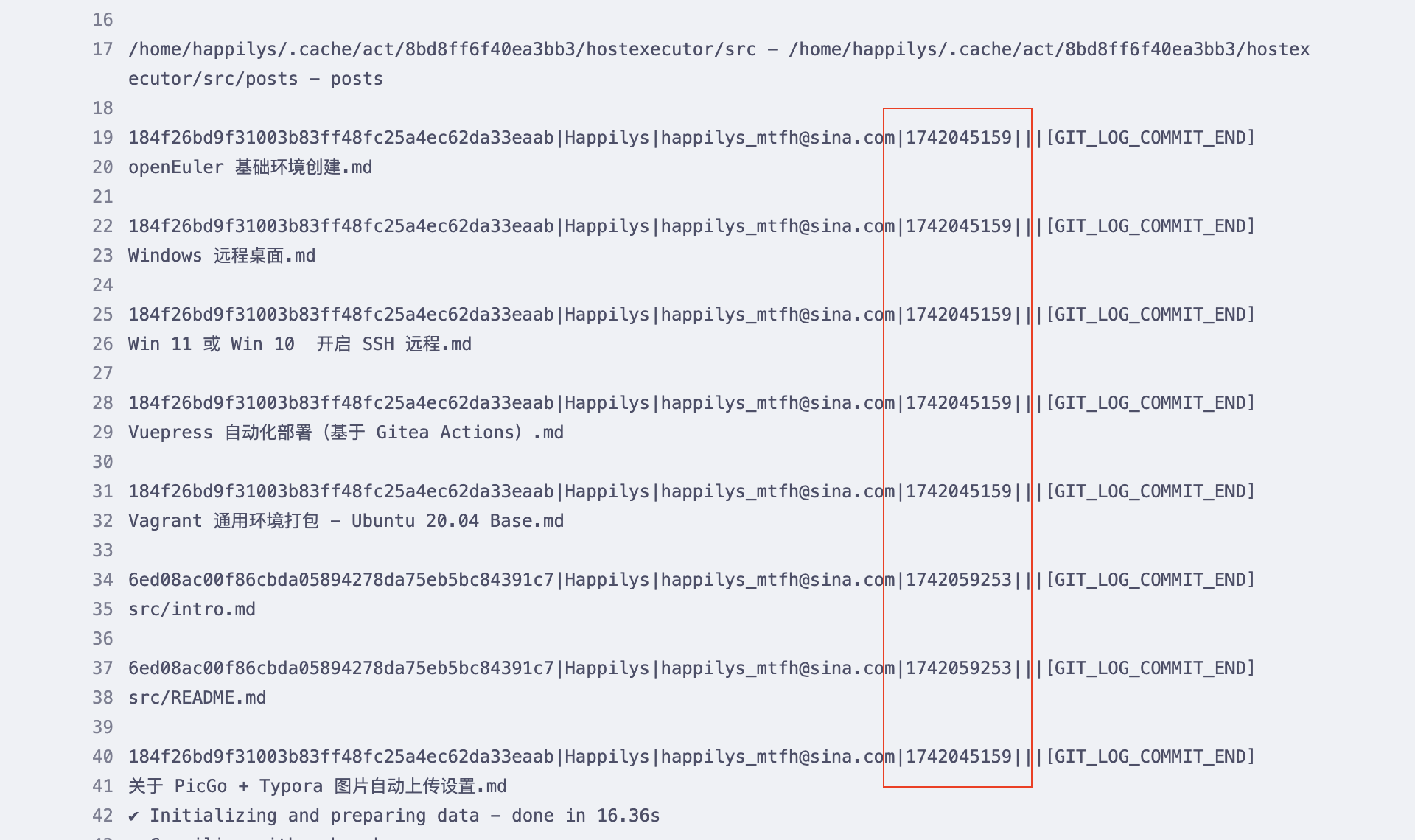
解决该问题的方式其实很简单,拷贝的时候采用完整拷贝。修改 .gitea/workflows/build-docs.yaml 内容如下
- name: Check out repository code
  uses: https://gitea.com/actions/checkout@v4
  with:
    fetch-depth: 0
    ssh-key: ${{ secrets.DEPLOYKEY }}
    ssh-known-hosts:  ssh-keyscan gitea.mtfh.cc
    submodules: true
云服务 1M 的带宽有点捉急,不过考虑到不需要自己在后台看着,其实也没啥影响。
调研过浅克隆恢复时间的办法,但是需要额外的命令,而且需要下载额外的软件包,想想暂时算了。
待修改的问题
- 注释掉第二版补丁中的日志
- 浅克隆情况下,如何解决时间相同问题 ?