
Vuepress 插件开发 - 版本历史
Vuepress 插件开发 - 版本历史
在此之前博客关于页内容始终是空白的,刚好自己也有查看博客改进记录的想法。「Vuepress Theme Hope」主题中的时间线功能仅展示文章发布历史,但是我希望能够看到博客修改记录(也就是 Git 提交历史),方便我快速浏览整个网站所做的修改。虽然 Gitea 本来就可以查看历史,但是把需要关注的内容收集到一块岂不更好?同时还能填补关于页的空白,何乐不为?
插件开发
在 .vuepress 目录里创建 plugins 目录用于存放所有的插件目录(目前只有一个)。然后创建 git-history 目录,这个目录里所有文件便是该插件的全部内容了。完成后的目录结构如下:
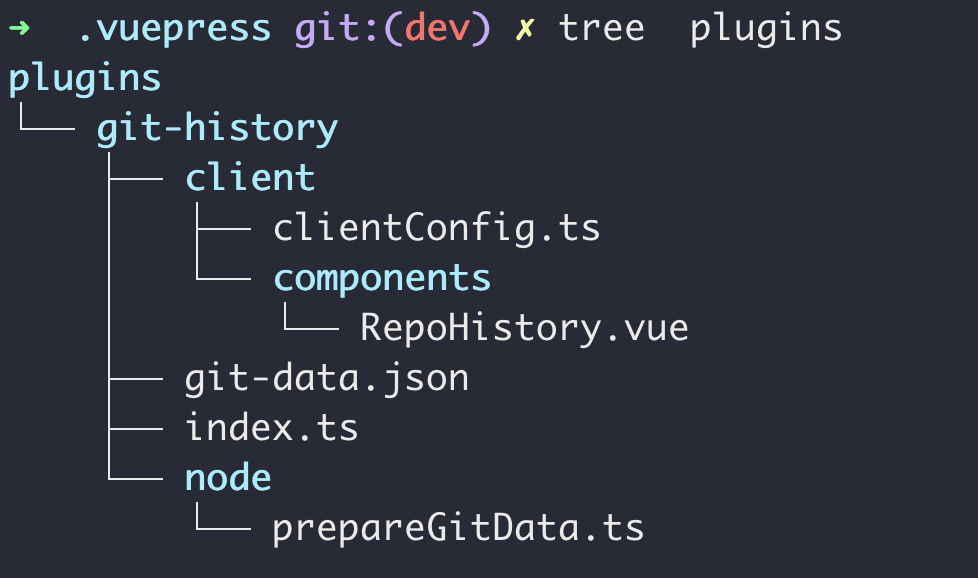
git-history 目录下的 index.ts 文件,提供插件的定义和导出。内容如下:
// src/index.ts
import { path } from '@vuepress/utils';
import type { Plugin } from '@vuepress/core';
import { prepareGitData } from './prepareGitData.js';
import pathModule from 'path';

const OUTPUT_FILE = pathModule.resolve(__dirname, './git-data.json');

const gitHistoryPlugin = (): Plugin => (app) => {
    return {
        name: 'vuepress-plugin-git-history',

        onPrepared() {
            prepareGitData(app.dir.source(), OUTPUT_FILE);
        },

        clientConfigFile: path.resolve(__dirname, './client/clientConfig.ts'),
    };
};

export default gitHistoryPlugin;
clientConfig.ts 文件用于注册 Vue 组件,并向 Vue 组件提供历史数据。大致内容如下:
// src/client/clientConfig.ts
import { defineClientConfig } from '@vuepress/client';
import RepoHistory from './components/RepoHistory.vue';
import gitData from '../git-data.json';

export default defineClientConfig({
    enhance({ app }) {
        app.component('RepoHistory', RepoHistory);
        app.provide('gitData', gitData);
    }
});
完成上述插件定义之后,需要去 vuepress 的配置文件使用插件。.vuepress 目录里的 config.ts 内容如下:
// 省略其他导入
import gitHistoryPlugin from './plugins/git-history/index.js'

export default defineUserConfig({
  // 省略其他配置

  plugins: [
    gitHistoryPlugin()
  ]
});
然后便是面向 AI 编程了[笑]。
最初并未想到可以直接在 .vuepress 目录下直接编写插件。原计划在项目根目录创建一个名叫 vupress-plugin-git-history 的 NPM 包项目,以一个独立的软件包视角去考虑这个问题。但是这样发现如何本地测试代码成为关键问题。参考了别人的指导并分析 tsconfig.json 配置之后发现事实并不需要如此麻烦。
"include": [
  "src/.vuepress/**/*.ts",
  "src/.vuepress/**/*.vue"
],
这两段内容告诉我放在 .vuepress 下的任何 Ts 和 Vue 组件都会被解析。将测试代码移动到 .vuepress 目录之后,是能够奏效的。
插件功能分析
版本历史插件核心功能便是展示博客仓库主分支的提交历史,并过滤掉文章相关的提交历史。另外方便查看具体的文件修改,提供了 Gitea Commit 超链接。具体的功能列表如下:
- 倒序排列所有非文章提交记录
- 展示每个提交记录的具体操作(如果有的话)
- 为每个记录提供 Gitea Commit 超链接(能够查看具体内容修改)
接下来详细介绍功能实现细节。每一个功能的前提都需要完整的提交记录,这点在之前给官方的 git 插件打补丁时有所了解。通过 node 执行相应的 git 命令可以很轻松地获取完整的提交记录,然后就是解析和过滤了,这个先不作具体分析。
解析出的数据首先存到 json 文件中去,然后 Vue 组件通过「客户端配置」将数据导入。查看 index.ts 和 clientConfig.ts 可以知道,插件调用 prepareGitData() 函数将数据写到指定的 json 文件,然后客户端调用 app.provide() 将数据提供给组件。Vue 组件内容如下:
<template>
  <div class="history-container">
    <h1>Version History</h1>
    <div class="timeline">
      <div v-for="(group, index) in groupedCommits" :key="index" class="timeline-group">
        <div class="timeline-label">{{ group.label }}</div>
        <div v-for="commit in group.commits" :key="commit.hash" class="timeline-entry">
          <div class="commit-dot"></div>
          <div class="commit-content">
            <a class="commit-message" target="_blank" :href="`${gitData.repoUrl}/commit/${commit.hash}`">{{ commit.message.short }}</a>
            <div class="commit-meta"> {{ commit.author }} · {{ formatDate(commit.date) }}</div>
            <ul v-if="commit.message.description">
              <li v-for="item in commit.message.description"> {{ item }}</li>
            </ul>
          </div>
        </div>
      </div>
    </div>
  </div>
</template>

<script lang="ts" setup>
import { computed, inject } from 'vue'
import type { GitCommit, GitData } from '../../node/prepareGitData.js'

const gitData = inject<GitData>('gitData', { repoUrl: "", commits: [] });

const formatDate = (dateStr) => {
  const date = new Date(dateStr)
  return date.toLocaleDateString()
}

const groupedCommits = computed(() => {
  const groups = {}
  for (const commit of gitData.commits) {
    const year = new Date(commit.date).getFullYear()
    if (!groups[year]) groups[year] = []
    groups[year].push(commit)
  }
  return Object.entries(groups)
      .sort((a, b) => b[0] - a[0]) // 倒序
      .map(([year, commits]) => ({
        label: year,
        commits
      }))
})
</script>
Vue 组件主要两件事儿,对提交的记录按年份分组;拼接 Gitea Commit 超链接。知道需要哪些数据之后,再来看 prepareGitData.ts 如何定义并解析数据。prepareGitData.ts 代码及解析如下:
提交记录的数据定义(应该把它们单独拿出来)。
export  interface GitMessage {
    tag: string;
    short: string;
    description: string[];
}

export interface GitCommit {
    hash: string;
    author: string;
    date: string;
    message: GitMessage;
}

export interface GitData {
    repoUrl: string;
    commits: GitCommit[];
}
获取远程仓库地址,并将 git 协议转换为 https。这里可以改进一下先判断当前协议,再考虑需不需要转换。
import { execSync } from 'child_process';

function getRemoteRepoUrl(repo: string) {
    try {
        const logs = execSync(
            `git remote get-url ${repo}`,
            {encoding: 'utf-8'}
        );
        const match = logs.trim().match(/^git@([^:]+):(.+?)\.git$/);

        const domain = match[1];
        const path = match[2];
        return `https://${domain}/${path}`;
    }
    catch (e) {
        return "";
    }
}
获取提交记录并以 GitCommit 数组形式返回。首先获取每个记录时需要完整哈希,用于拼接 Gitea Commit 超链接。
其次由于每条提交记录需要有详细描述,因此在分割时就不能简单地把换行符作为分隔符了,这里参考了官方 git 插件的做法。
然后详细描述在记录的时候约定使用 Markdown 形式的无序或有序列表,这里为了方便组件渲染,将它拆解为字符串数组。需要注意的是详细描述可能为空字符串,这时的 description 字段应该是空数组,而不是 [""] 。
最后根据提交描述约定,比如 “Posts: 2025-04-09 14:03:58” 、“Feature: 关于页添加版本历史” ,使用 ": " 分隔符拆解出提交类型和描述信息即可。
import { execSync } from 'child_process';

const SPLIT_CHAR = '[GIT_LOG_COMMIT_END]';
const RE_SPLIT = /\[GIT_LOG_COMMIT_END\]$/;

function getRepoHistory(): GitCommit[] {
    try {
        const logs = execSync(
            `git log --pretty=format:"%H|%an|%ad|%s|%b${SPLIT_CHAR}" --date=short`,
            {encoding: 'utf-8'}
        );
        return logs
            .replace(RE_SPLIT, '')
            .split(`${SPLIT_CHAR}\n`).map(line => {
                const [hash, author, date, message, content] = line.split('|');
                const description: string[] = content === "" ? [] : content.trim().split('\n');
                const [tag, short] = message.split(': ');
                return {hash, author, date, message: {tag, short, description}};
            });
    } catch {
        return [];
    }
}
过滤掉文章记录以及写到文件。根据前面提到的「描述约定」,只需要筛选出非 Posts 提交类型即可。
import fs from 'fs';

function filterPosts(commits: GitCommit[]): GitCommit[] {
    return commits.filter(commit => commit.message.tag?.toLowerCase() !== 'posts');
}

export function prepareGitData(sourceDir: string, outputFilePath: string) {
    const gitData: GitData = { repoUrl: getRemoteRepoUrl("origin"), commits: filterPosts(getRepoHistory()) };
    fs.writeFileSync(outputFilePath, JSON.stringify(gitData, null, 2));
}
最后得到的 json 数据大致如下:
 {
  "repoUrl": "https://gitea.mtfh.cc/mtfhx/vuepress-starter",
  "commits": [
    {
      "hash": "b153bf72c70712a856d2a32983d6b3069c770394",
      "author": "Happilys",
      "date": "2024-11-12",
      "message": {
        "tag": "Update",
        "short": "删除一些不需要的内容",
        "description": [
          "1. 删除示例文件",
          "2. 删除一些不需要的注释",
          "3. 取消导航栏自动隐藏功能",
          "4. 先不使用搜索功能"
        ]
      }
    }
  ]
}
至此这个插件所需要的功能基本完成。
问题和需要完善的内容
- 是否将插件独立出来 ?
过去我理解的是一个完整的作品,必然需要成体系化的打包出来。比如说这个插件,我就应该将它作为一个独立的插件打包成一个 npm 包,后续迭代都基于这个 npm 包。但工作几年后,有很多软件、作品并不能走完完整的生命周期。有时候一个工具可能只是单纯的几行代码,想起来的时候就拷贝过来,后来随着需求和技术的迭代也许再也用不上了。这种情况下,去把这些代码打包成插件或软件,便显得非常多余了。
因此在这件事上,我会改变过去的思维习惯,以需求为核心——关注功能本身吧。至于需不需要打包出来,如果这玩意真的能够被大多数人所认可,再打包也不迟。
- 将来需要完善的内容 ?
首先 UI 这块不满意。本来计划等到 UI 完善之后再发布,但是不论是 UI 设计和实现上自身能力都不能达到自己所期望的样子,如果任何事情都等到自己达到相应的能力再去执行的话,就会失去很多机会——最现实的问题就是时间线会无限拉长,最后导致计划「难产」。索性就以当下的状态展示出来,给自己时间学习然后再去改进。
当下历史记录并不多,因此随手划一下就到底了,也就不需要分页或懒加载的方式来应对数据问题。但是将来修改的记录变多,不管是 UI 交互上还是背后的数据处理上都需要做相应的改进。像翻最早的记录要划啦半天,加载数据需要耗费数秒时间这些事是不能够的。数据的积累可能需要半年至一年的时间吧,所这件事不急。
- 插件 UI 语言问题
开头的 「Version History」看起来挺扎眼的。博客的默认语言是中文,但总有许多英文出现的地方。一些地方是固定内容不作翻译,但还有很多地方其实是需要翻译为中文的。对了,博客目前没做国际化支持,所以语言方面都挺随意的。后续不管是插件还是博客本身,需要对语言进行统一管理,至少支持中英两种语言支持。