
Win 11 或 Win 10 开启 SSH 远程
2024/11/12大约 1 分钟
Win 11 或 Win 10 开启 SSH 远程
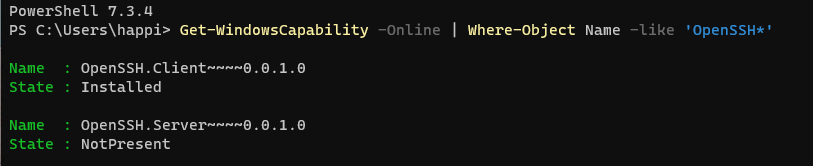
一、以管理员身份运行 Powershell 以获取当前是否安装 SSH 服务
Get-WindowsCapability -Online | Where-Object Name -like 'OpenSSH*'执行可能结果如下:
二、以管理员身份执行如下命令来安装 SSH 服务
# Install the OpenSSH Server
Add-WindowsCapability -Online -Name OpenSSH.Server~~~~0.0.1.0
执行结果:

三、启动 SSH 服务,并开放对应端口
# Start the sshd service
Start-Service sshd

# Auto start, OPTIONAL but recommended:
Set-Service -Name sshd -StartupType 'Automatic'

# Confirm the Firewall rule is configured. It should be created automatically by setup. Run the following to verify
if (!(Get-NetFirewallRule -Name "OpenSSH-Server-In-TCP" -ErrorAction SilentlyContinue | Select-Object Name, Enabled)) {
    Write-Output "Firewall Rule 'OpenSSH-Server-In-TCP' does not exist, creating it..."
    New-NetFirewallRule -Name 'OpenSSH-Server-In-TCP' -DisplayName 'OpenSSH Server (sshd)' -Enabled True -Direction Inbound -Protocol TCP -Action Allow -LocalPort 22
} else {
    Write-Output "Firewall rule 'OpenSSH-Server-In-TCP' has been created and exists."
}
四、将默认的 CMD 改为 Powershell
!!! Note:此命令需要保证 Powershell 7 已安装并且路径正确或自行替换正确的 Powershell 路径
New-ItemProperty -Path "HKLM:\SOFTWARE\OpenSSH" -Name DefaultShell -Value "C:\Program Files\PowerShell\7\pwsh.exe" -PropertyType String -Force执行结果:

使用 SSH 密钥登录
- 生成密钥对
- 部署公钥
管理员用户公钥需放置在服务器上的一个名为 administrators_authorized_keys 的文本文件中,此文件存在于 C:\ProgramData\ssh , 并且该文件上的 ACL 需要配置为仅允许访问管理员和系统。
icacls.exe "C:\ProgramData\ssh\administrators_authorized_keys" /inheritance:r /grant "Administrators:F" /grant "SYSTEM:F"