
Vuepress 文章自动分类
Vuepress 文章自动分类
Vuepress Theme Hope 主题默认启用文章分类功能,该功能通过 FrontMatter 中的 category 字段来识别不同类别。如果我希望为文章添加分类就需要维护每篇文章的 category 字段。如果我将这篇文章放在 Web 分类下,一个月后忘记自己设置过 Web 分类,需要翻阅过去的内容,要么重新命名一个 「前端」分类。
因此,我希望实现根据文章所在目录自动进行分类的功能。观察目录结构,所有的类别一目了然,也不需要手动编辑 FrontMatter 中的 category 属性。
根据 Vuepress 插件文档,定制一套分类规则也许更灵活。但毕竟对 Vuepress 理解有限,直接修改博客插件规则较为麻烦,不如改写 FrontMatter 更容易理解。
自动分类插件
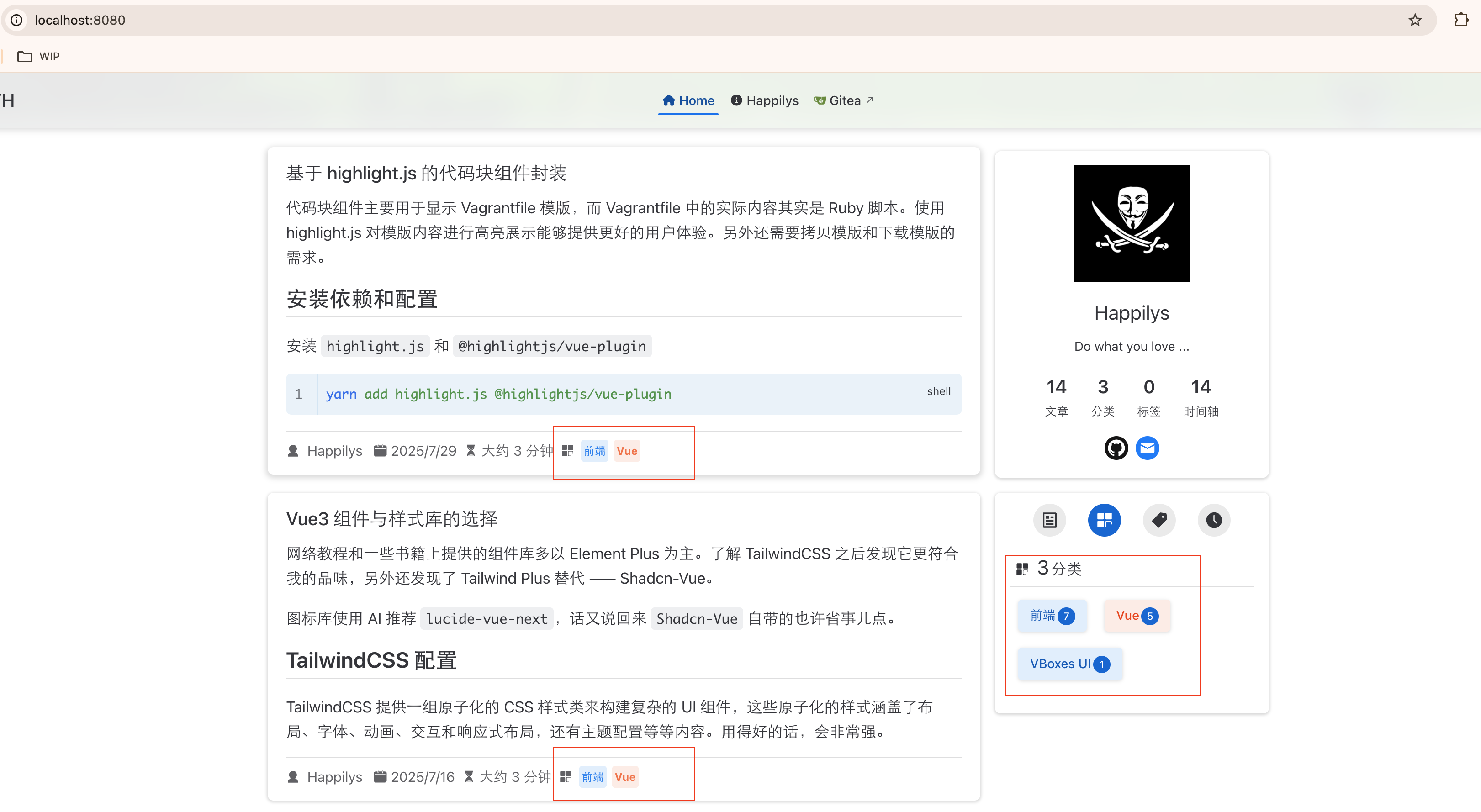
自动分类插件通过 autoCategory 函数递归地遍历文档根目录,也就项目中的 posts 目录。通过比较文章所在目录和文档根目录获得到文章的分类列表。比如 posts/前端/Vue/基于 highlight.js 的代码块组件封装 就被归类到 前端 和 Vue 这两个类别。
实现代码如下:
// scripts/auto-category.js
import fs from "fs";
import path from "path";
import matter from "gray-matter";

let docsDir: string;

export function autoCategory(dir: string) {
    if (!docsDir) { docsDir = dir; }

    const entries = fs.readdirSync(dir);
    for (const entry of entries) {
        const fullPath = path.join(dir, entry);
        const stat = fs.statSync(fullPath);
        if (stat.isDirectory()) {
            autoCategory(fullPath);
        } else if (entry.endsWith(".md")) {
            const content = fs.readFileSync(fullPath, "utf8");
            const parsed = matter(content);

            if (parsed.data.category) continue;

            const dirRelativePath = path.relative(docsDir, dir);
            const category = dirRelativePath === "" ? [] : dirRelativePath.split(path.sep);

            if (category.length > 0) {
                parsed.data.category = category;
                const newContent = matter.stringify(parsed.content, parsed.data);
                fs.writeFileSync(fullPath, newContent);
                console.log(`Added category "${category}" to ${path.relative(docsDir, fullPath)}`);
            }
        }
    }
}
插件部分定义如下:
// src/index.ts
import path from 'path'
import type { Plugin } from '@vuepress/core';
import { autoCategory } from './node/autoCategory.js'

const autoCategoryPlugin = (docDir: string | string[]): Plugin => (app) => {
    return {
        name: 'vuepress-plugin-auto-category',

        onPrepared() {
            const dirs = Array.isArray(docDir) ? docDir : [docDir];
            const absDirs = dirs.map((dir) => path.resolve(app.dir.source(), dir));

            for (const absDir of absDirs) {
                autoCategory(absDir);
            }
        }
    };
};

export default autoCategoryPlugin;导入依赖并注册插件,然后执行打包脚本两次即可获得带有文章分类的博客。
// 其他内容省略
import autoCategoryPlugin from "./plugins/auto-category/index.js";


export default defineUserConfig({
  // 省略的配置
  plugins: [
    autoCategoryPlugin("posts")
  ]
});
改插件为 FrontMatter 预处理脚本
因为某些原因,不得不将插件的 autoCategory.ts 挪出来作为独立的预处理脚本。
修改后 scripts/auto-category.ts 代码内容如下:
import fs from 'fs';
import path from 'path';
import matter from 'gray-matter';

const docsDir = path.resolve(__dirname, '../src/posts');

function autoCategory(dir: string) {
    let count = 0;
    const entries = fs.readdirSync(dir);
    for (const entry of entries) {
        const fullPath = path.join(dir, entry);
        const stat = fs.statSync(fullPath);
        if (stat.isDirectory()) {
            count += autoCategory(fullPath);
        } else if (entry.endsWith(".md")) {
            const content = fs.readFileSync(fullPath, "utf8");
            const parsed = matter(content);

            if (parsed.data.category) continue;

            const dirRelativePath = path.relative(docsDir, dir);
            const category = dirRelativePath === "" ? [] : dirRelativePath.split(path.sep);

            if (category.length > 0) {
                parsed.data.category = category;
                const newContent = matter.stringify(parsed.content, parsed.data);
                fs.writeFileSync(fullPath, newContent);
                console.log(`Added category "${category}" to ${path.relative(docsDir, fullPath)}`);
                count++;
            }
        }
    }
    return count;
}

// 执行入口
(function main() {
    console.log(`📁 Scanning Markdown files in: ${docsDir}`);
    const changed = autoCategory(docsDir);
    console.log(`✅ Done. ${changed} file(s) updated.`);
})();
由于需要将该文件作为独立的脚本运行,并且使用的是 TypeScript 语法(也可以把代码改为 JavaScript 直接丢给 Node 执行),这里使用 ts-node 包来执行 Ts 脚本。
yarn add -D ts-node typescript另外在 package.json 中的 scripts 对象中添加如下命令
{
  "type": "module", // 这一行需要删掉
  "scripts": {
    // 需要添加的命令
    "docs:prebuild": "ts-node scripts/auto-category.ts",
  }
}
这里需要删掉 "type": "module" 这行, 不然会出现 TypeError: Unknown file extension ".ts" for xxx.ts 错误。

最后执行以下命令便可以生成和前面相同的内容
yarn docs:prebuild

yarn docs:dev
# 或者
#yarn docs:build
当时在做这项修改的时候挺膈应的,需要变更的内容太多了。除了修改代码,还需要安装额外的依赖、修改 package.json 和 CI 文件(build-docs.yaml)。
经验有限,一时半会儿也想不到比较好的办法,因此只能强行去改了。
写这篇文章时想到了一个更快的方法,只需要改动一行代码就能解决问题 😂。
实现自动分类时出现的问题
以下是在测试中遇到的一些问题。第一条并非真实问题,最后一条属于事先调研不充分,第二条才算是实实在在的问题。但既然已经发生,就不存在真实问题和虚假问题的区别了。
添加分类后文章排序降低
修改文章的目录结构后,预期结果——最新发布的文章排序应该和未分类时的相同,并且文章状态栏包含分类信息。此时使用的还是插件的形式,在分类页中能看到已经分类过的文章,但是主页中这些文章被放到了文章列表的末尾(开始在主页里不到,下意识认为主页没索引这些文章)。
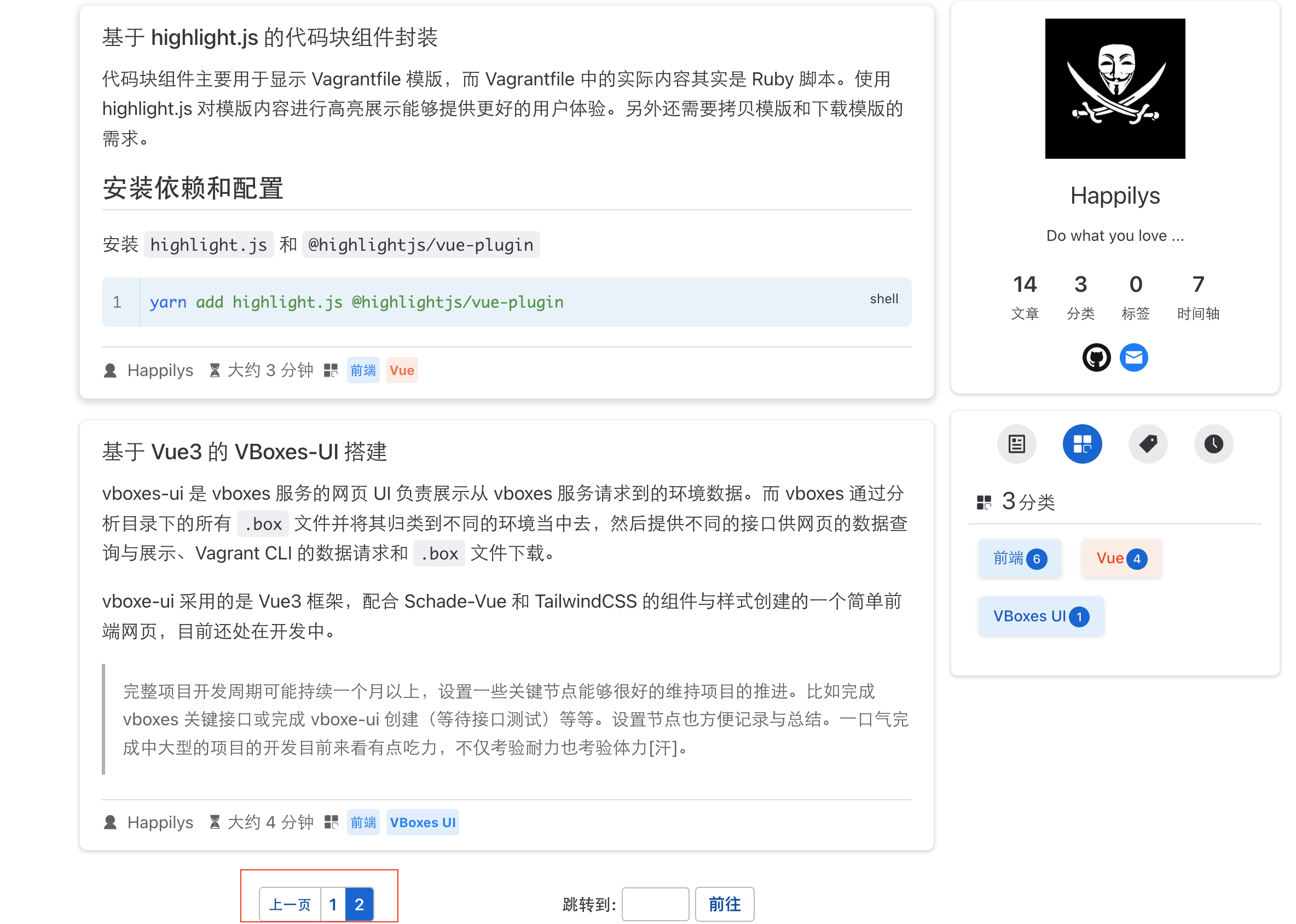
此时怀疑是 Vuepress 的文章排序规则导致的——子目录中的文章优先级始终低于父目录。实则并没有这项机制,不论是 AI 还是自行验证都是如此。
这时候就体现了 AI 的优势,问 AI 几秒钟就能得出结论,但手动测试的话就需要十五到二十分钟了。因为本就是不熟悉才需要测试,在不熟悉的状态下配置相同的环境,然后再去模拟相似的场景实验,就非常麻烦。
上述场景建立在独立探索情景下,如果有前辈指导那这篇文章也许就不存在了。
知道了文章排序优先级不受目录层级影响后,发现一条关键线索——分类过的文章日期丢了。
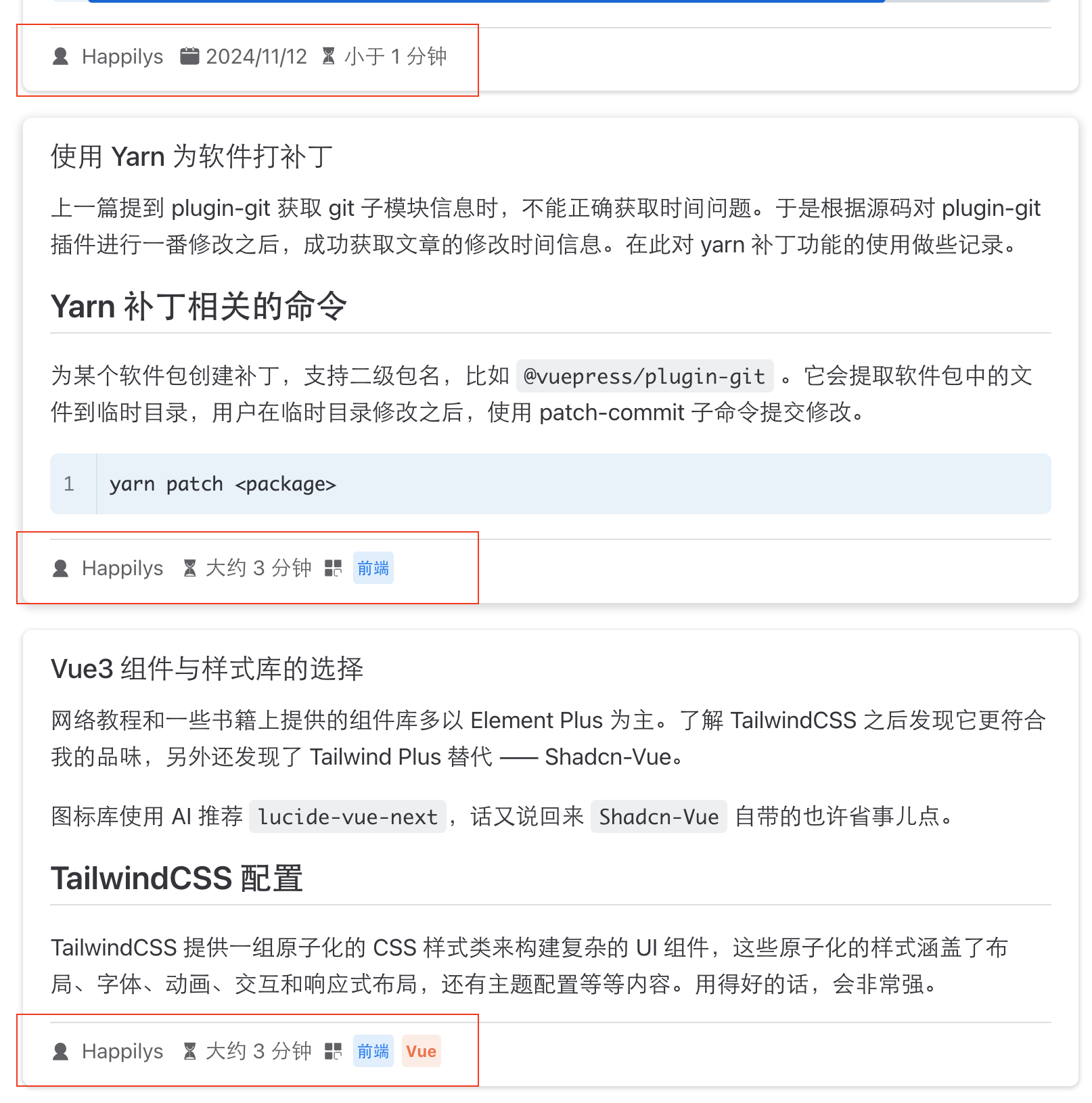
顺着年初给 Git 插件打补丁的思路,一路排查到 Git 命令行发现——修改了文章目录位置却还没提交,Git 也就查不到记录。
也许插件的实现和发布中间隔的时间太久了,改完之后就做测试和发布应该不会出这种情况。
文章目录结构变化导致原链接失效
由于改变目录结构就会改变链接地址,考虑到改动已发布的文章目录位置,会导原链接失效。需要为旧地址设置重定向,来指向新的地址。
做法很简单,为每个移动过的文章添加一条 FrontMatter 属性,名称为 redirectFrom ,值为移动前文的位置,原文件不需要真实存在。该功能是由 redirect-plugin 实现,已由 Vuepress Theme Hope 主题内置并默认开启。
需要注意的是默认的开发服务器对此项设置并不会生效(但 redirectTo 却可行)。打包之后,使用 Python 启动一个静态服务器,测试成功。
python3 -m http.server 8080 --directory src/.vuepress/dist/具体原因是…… ?
采用插件的方式生成分类信息失败
由于在插件中注册的任何一个钩子调用时机均迟于 plugin-blog 创建分类信息的时机,因此 plugin-blog 创建分类信息时并不知道文章有分类信息。而第二次执行能成功,是因为第一次已经为文章添加好了分类数据——这就相当于人为地为文章添加了分类信息,然后执行打包脚本。事实上,第二次 auto-category 插件并未向文件写入分类信息。
| Hook | 触发时机 | 能否修改 FrontMatter | 备注 |
|---|---|---|---|
onInitialized | VuePress 应用刚初始化完 | 太早,不可靠 | 目录未扫描,不建议用来写页面 |
onPrepared | 构建前、页面数据读取前 | 能,迟于 plugin-blog | 大多数向页面写内容的插件都可以使用该 Hook |
onWatched | dev 模式监听启动后 | 仅 dev 模式有效 | 非构建流程,不适合写 .md |
onGenerated | 页面都构建完了 | 修改无效,太晚 | 适合生成 sitemap、统计等 |
之所以将插件改为独立的脚本,原因在此——插件的调用时机总迟于 pluging-blog,所以将插件功能独立出来,手动地在打包之前调用该脚本。保证自动部署时,打包阶段解析的文章的分类信息已经生成。
但其实有个很简的办法——自动部署时让 yarn docs:build 命令执行两遍就可以了。
从逻辑上,改为预处理脚本更符合直觉,但第二种方式成本更低。
如果就当时想到了第二种方式,那我肯定用第二种;如果别人告诉我的,可能还会坚持原来的方式吧(因为不是自己思考的,也许并不能理解)。
这大概就是现实场景中,很多行为无法理解却又不得照抄的原因之一吧!
相对于真实的成本而言,执行者是否理解并不重要!